
Scheduled REST API JSON Exports
Axacon WMS can send JSON data automatically to external REST endpoints by using scheduled commands. This is useful when: A model contains too much data for a synchronous request. Reports must be delivered at fixed intervals. Different data types must be sent to different endpoints. Data must be transformed before delivery. Schedules use CRON notation […]
Stock Queries and Item Ledger Reports
Retrieve available stock GET https://[SERVER]/integration/rest/V1/ItemInst?finder=findByExternStatusReceived For large stock datasets, use a filtered finder instead of retrieving every record. Generate an item ledger report POST https://[SERVER]/integration/rest/V1/generateItemLedgerReport/ITEM_LEDGER_REPORTS?fromInMs=0 The fromInMs parameter represents milliseconds since the Unix epoch. Use it to request ledger entries created after a known point in time. Available report types SALES_REPORT PURCHASE_REPORT RETURN_REPORT GENERIC_REPORT GOODS_ISSUE_REPORT […]
Updating and Closing Warehouse Orders
Axacon WMS prevents unsafe order changes after warehouse processing has started. Standard update pattern Close the order. Check the REST API response. Change the order in ERP. Reopen the order. Send the updated JSON payload. Purchase orders Close a purchase order POST https://[SERVER]/integration/rest/V1/executeCommandInfo/ClosePurchaseOrder { “0”: “6003” } Reopen purchase orders POST https://[SERVER]/integration/rest/V1/executeCommandInfo/ReopenPurchaseOrders { “0”: “6003” […]
Sales Orders and Outbound Deliveries
A released sales order in ERP can be converted into an outbound delivery and sent to Axacon WMS. Recommended integration sequence Zip code Addressee Sales order Sales-order lines Create the addressee POST https://[SERVER]/integration/rest/V1/Addressee { “Id”: “47586622”, “Name”: “Monabekken Barnesenger A/S”, “Address1”: “Solbakken 21”, “Address2”: “”, “Address3”: “Aarhus”, “City”: “Aarhus”, “Country”: “DK”, “Attention”: “Mona”, “ZipCode”: “8000” […]
Return Order Integration
A return order can be released from ERP directly to Axacon WMS. Recommended integration sequence Zip code Addressee Return order Return-order lines Create the zip code POST https://[SERVER]/integration/rest/V1/ZipCode { “Id”: “8000”, “City”: “Aarhus C” } Create the addressee POST https://[SERVER]/integration/rest/V1/Addressee { “Id”: “47586622”, “Name”: “Monabekken Barnesenger A/S”, “Address1”: “Solbakken 21”, “Address2”: “”, “Address3”: “Aarhus”, “City”: […]
Purchase Orders and Inbound Deliveries
A released purchase order in ERP can be converted into an inbound delivery and transferred to Axacon WMS. The transfer can be started manually or by a scheduled task. Recommended integration sequence Zip code Supplier Purchase order Purchase-order lines Create the zip code POST https://[SERVER]/integration/rest/V1/ZipCode { “Id”: “0010”, “City”: “Oslo” } Create the supplier POST […]
Item Master Data Integration
Item master data is owned and maintained in ERPs like Microsoft Dynamics 365 Business Central or Perfion. It is possible to change item data directly in Axacon WMS, but those changes are not sent back to Business Central or Perfion. Data ownership ERP is the source of truth for item master data. Changes made directly […]
Endpoints, Finders, and Commands
The Axacon WMS REST API uses three main endpoint patterns: Entity endpoints Finders Commands Entity endpoints Entity endpoints create, retrieve, update, or delete records. Retrieve one item GET https://[SERVER]/integration/rest/V1/Item/Item6 Retrieve all items GET https://[SERVER]/integration/rest/V1/Item?finder=findAll Delete an item DELETE https://[SERVER]/integration/rest/V1/Item/Item6 Finders A finder is a predefined query that retrieves data using business-specific criteria. Find stock for […]
Authentication and Work Context
Basic Authentication The Axacon WMS REST API uses Basic Authentication with a username and password. The API user must: Have a valid username and password. Belong to the INTEGRATION user group. Have access to the required owner, company, and warehouse. Why Work Context matters Axacon WMS uses a Work Context to determine which owner, company, […]
Overview
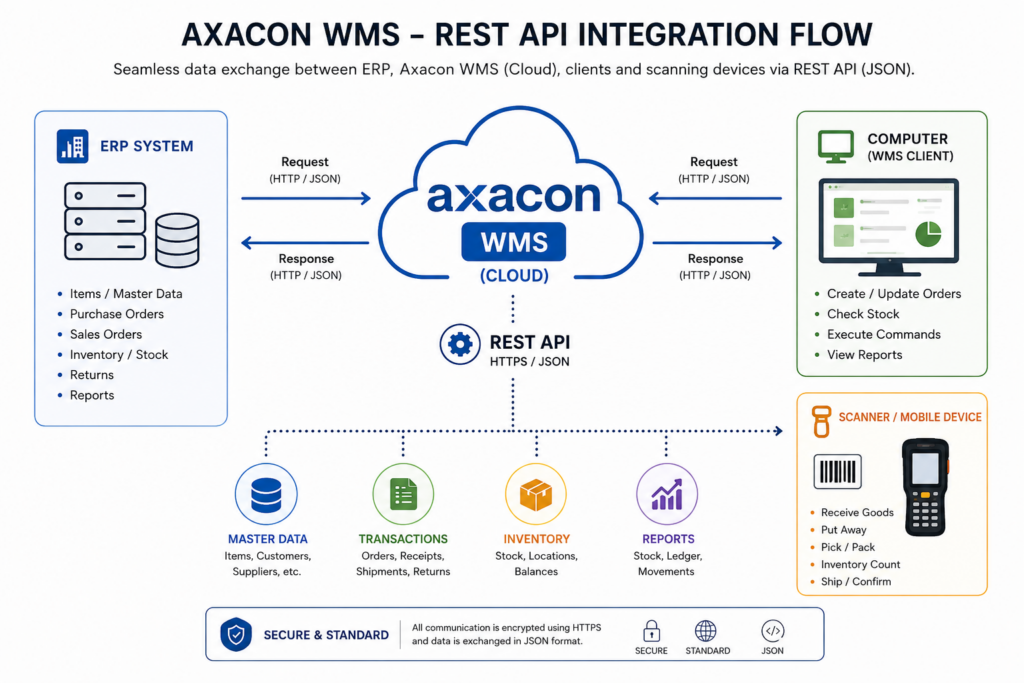
Axacon WMS provides a REST API for exchanging JSON data with external systems, including Microsoft Dynamics 365 Business Central. The API can be used to exchange master data, purchase orders, return orders, sales orders, stock information, item ledger reports, and scheduled exports. Base URL The API base URL normally follows this pattern: https://[SERVER]/integration/rest/V1/ Replace [SERVER] […]